Here are the steps to make sure that the team standings for a separate session / section / quarter / event (including Playoffs) is reset to zero:
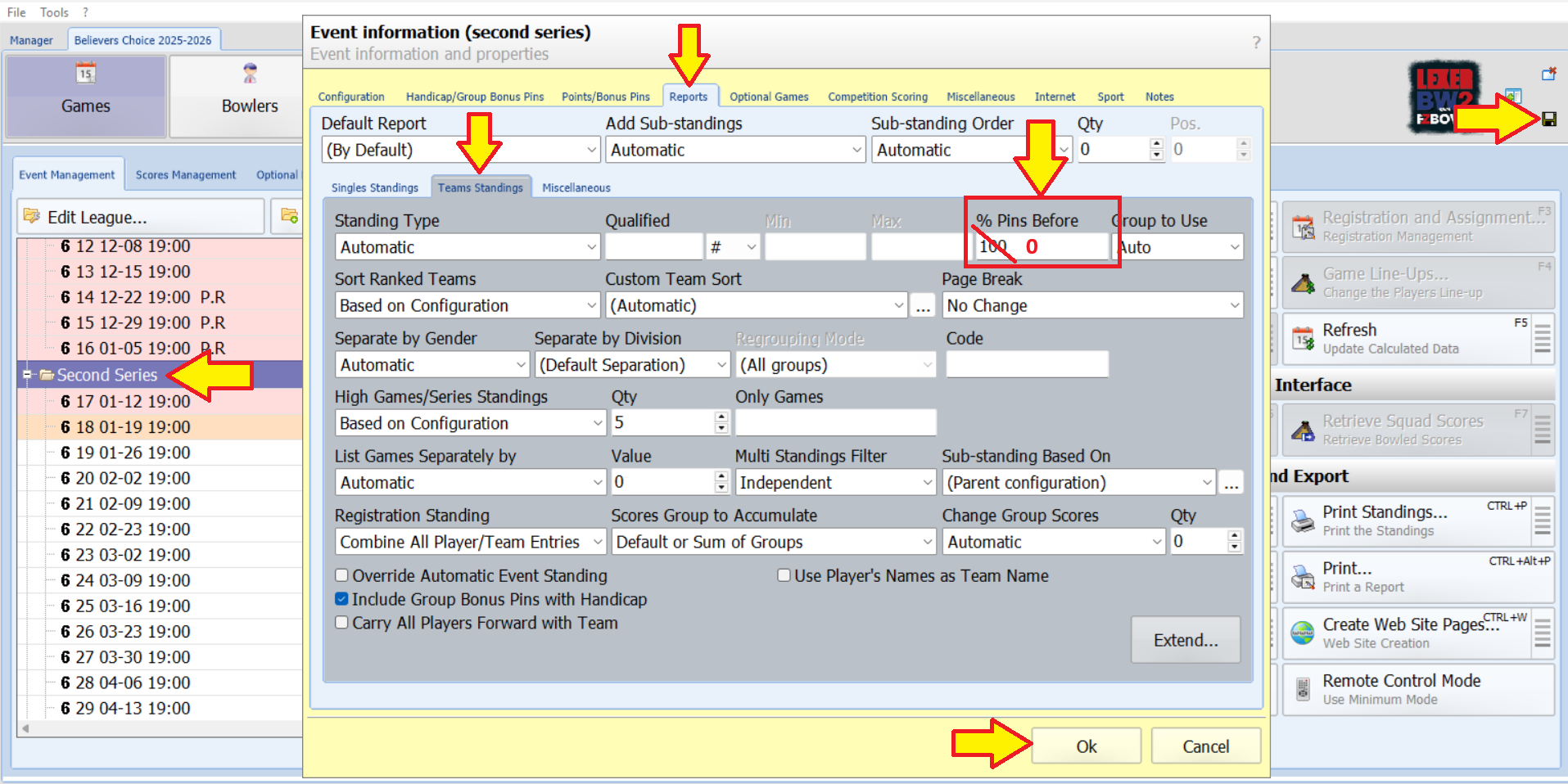
1) Double-click the Event (the yellow folder corresponding to the session in which the team standings have to be reset to zero).
2) Go to Reports > Team Standings.
3) % Pins Before: This field typically defaults to 100, which means that the event keeps every statistic from the previous event to start this new event. To reset the team standings to zero, replace the value of 100 with 0. This action will ensure that all teams begin the event with a clean slate.
4) Click OK to confirm and exit out.
5) Click the little brown diskette icon located at the top right corner of the screen to save the modifications.
6) Once you have reset the standings, you can proceed to simulate scores for the first week of this event to make sure that the team standings show the standings after this first week.
You may watch this short video as well:
Was this article helpful?
That’s Great!
Thank you for your feedback
Sorry! We couldn't be helpful
Thank you for your feedback
Feedback sent
We appreciate your effort and will try to fix the article